
Quick guide
What you will see
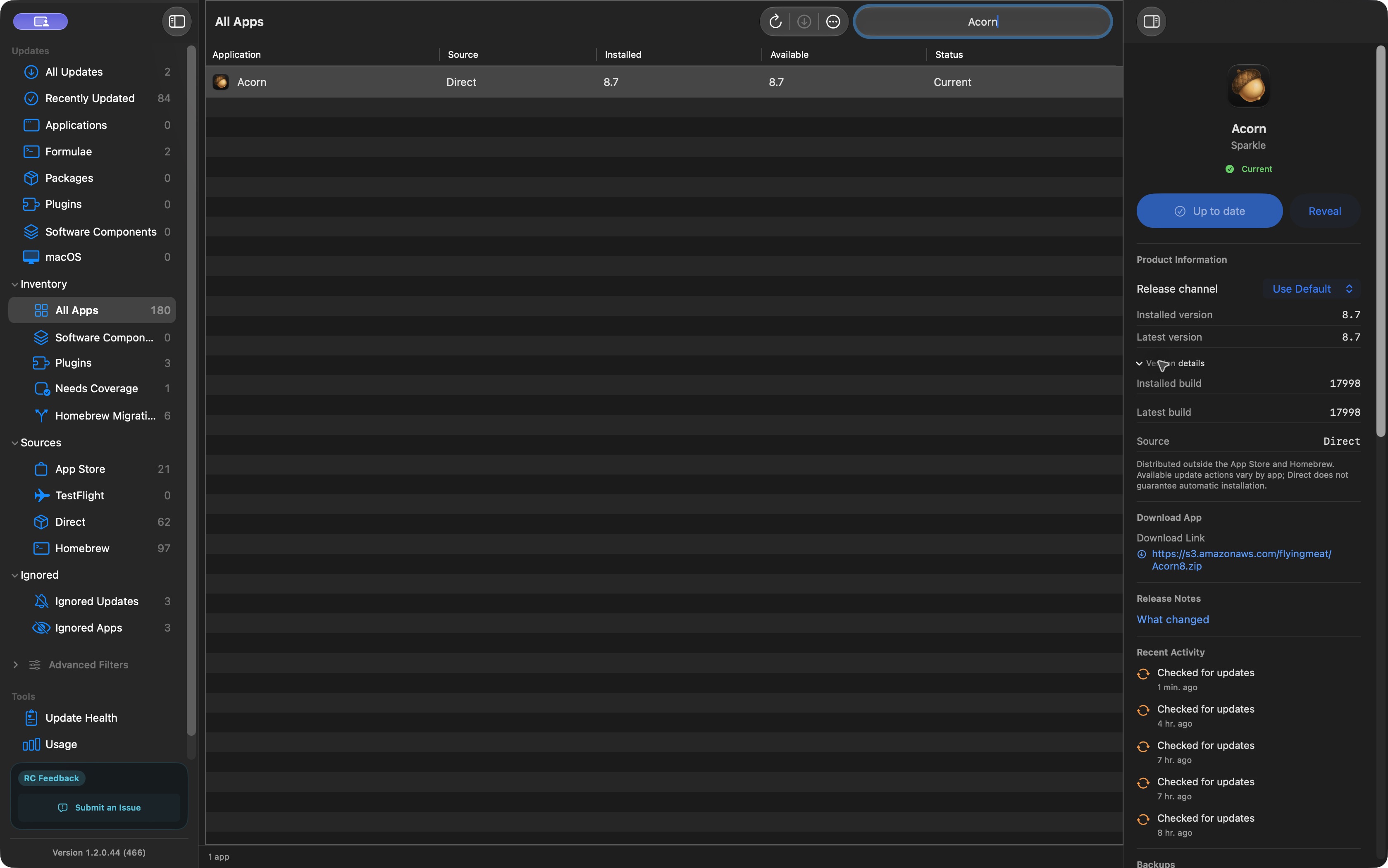
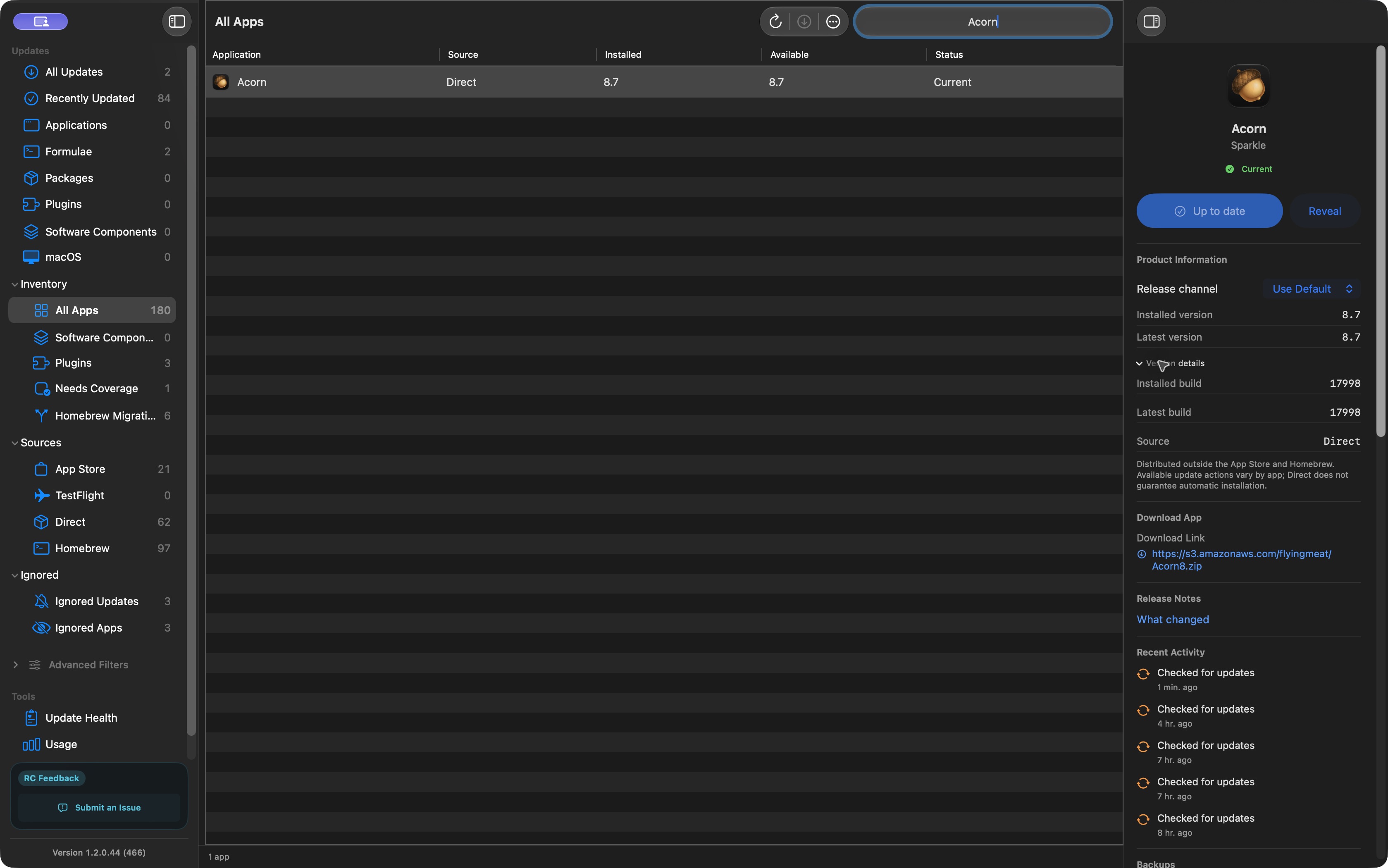
This example shows Acorn moving from build 17993 to build 17998 in macCurrent 1.2.0.44. We checked the saved update history, the older backup, and the installed app. We checked this ourselves as the maker of macCurrent. It is not an independent review or a test of every app.
1. Check for updates
Open macCurrent and choose Check for Updates. In All Apps, select an app to see its installed version and any newer version found.
Need the app first? Follow the installation steps. The current release candidate is free for Apple silicon and Intel Macs running macOS 15 or later.
2. See where the update comes from
Acorn shows Direct as its source and Sparkle as its updater. Direct means the app came from outside the App Store and Homebrew. It does not mean macCurrent can install every update for it.
Open Version details to see the build number. A build number identifies a particular release of the app. Here, both copies say version 8.7, but the build changed from 17993 to 17998.
The screenshot was taken after the update. Acorn now shows Current because its installed and available builds are both 17998.
Before updating your own app, save your work and read what changed. If macCurrent directs you to the App Store or the app's own updater, follow that step.
3. Find the backup
Acorn's details show a backup of version 8.7, build 17993. It was created at 1:56 PM Central on October 12, 2026. We checked the saved copy and confirmed its version.
An app backup saves the program, not your documents or settings. Keep those backed up separately. Restoring an older app may not undo changes the newer version made to your data.
Read how to back up an app before updating before relying on a saved copy.
4. Check the update result
The saved activity says Acorn downloaded and installed successfully. We also checked the app on disk. It reports build 17998, which matches the update result.
| What we checked | What we found |
|---|---|
| Older backup | Acorn 8.7, build 17993 |
| Installed app | Acorn 8.7, build 17998 |
| Saved install result | Updated to 8.7 (17998) |
| Current update check | Installed and available builds are both 17998 |
A finished download is not the same as an installed update. For your own updates, check the result and open the app to see whether it still works as expected.
What we checked, and what we did not
We reviewed an update that had already finished. We did not run another update to create this page. We checked the backup and installed app, but did not restore the backup or open Acorn after the update as part of this check.
This example does not test every update source, Mac model, or macOS version. It does not compare macCurrent with other products.
Technical details behind this example
We used macCurrent 1.2.0.44, build 466, on an Apple silicon Mac running macOS 27.0.1. The public installer matched its published checksum. Its signatures, Apple notarization, helper layout, and Apple silicon/Intel executables passed the release checks. These checks are not an independent security audit.
Both Acorn copies have app identifier com.flyingmeat.Acorn8 and developer team WZCN9HJ4VP. Both passed strict code-signature checks. The installed copy also passed Gatekeeper, Apple's check for downloaded apps.
The saved download finished at 2026-10-12 18:55:58 UTC. The saved installation finished at 2026-10-12 18:56:02 UTC. The recorded update feed is Flying Meat's Acorn feed.
Download the detailed check record or the original screenshot. Personal paths and unrelated apps are not included in the published record.
Frequently asked questions
Is this a real example?
Yes. The screenshot is from released macCurrent 1.2.0.44, build 466. We checked a completed Acorn update against its saved history, backup, and installed app. We did not stage another update.
Why do both versions say 8.7?
The version name stayed at 8.7, but the build changed from 17993 to 17998. The build number lets you tell these releases apart.
Did you test restoring the backup?
No. We checked that the backup exists and checked its version and signature. We did not test restoring it or opening Acorn after the update.
Can macCurrent install every update?
No. Some updates need the App Store, the developer's updater, an administrator, or another manual step. Follow the action shown for the app.