
Quick guide
Can macCurrent update VS Code extensions and JetBrains plug-ins?
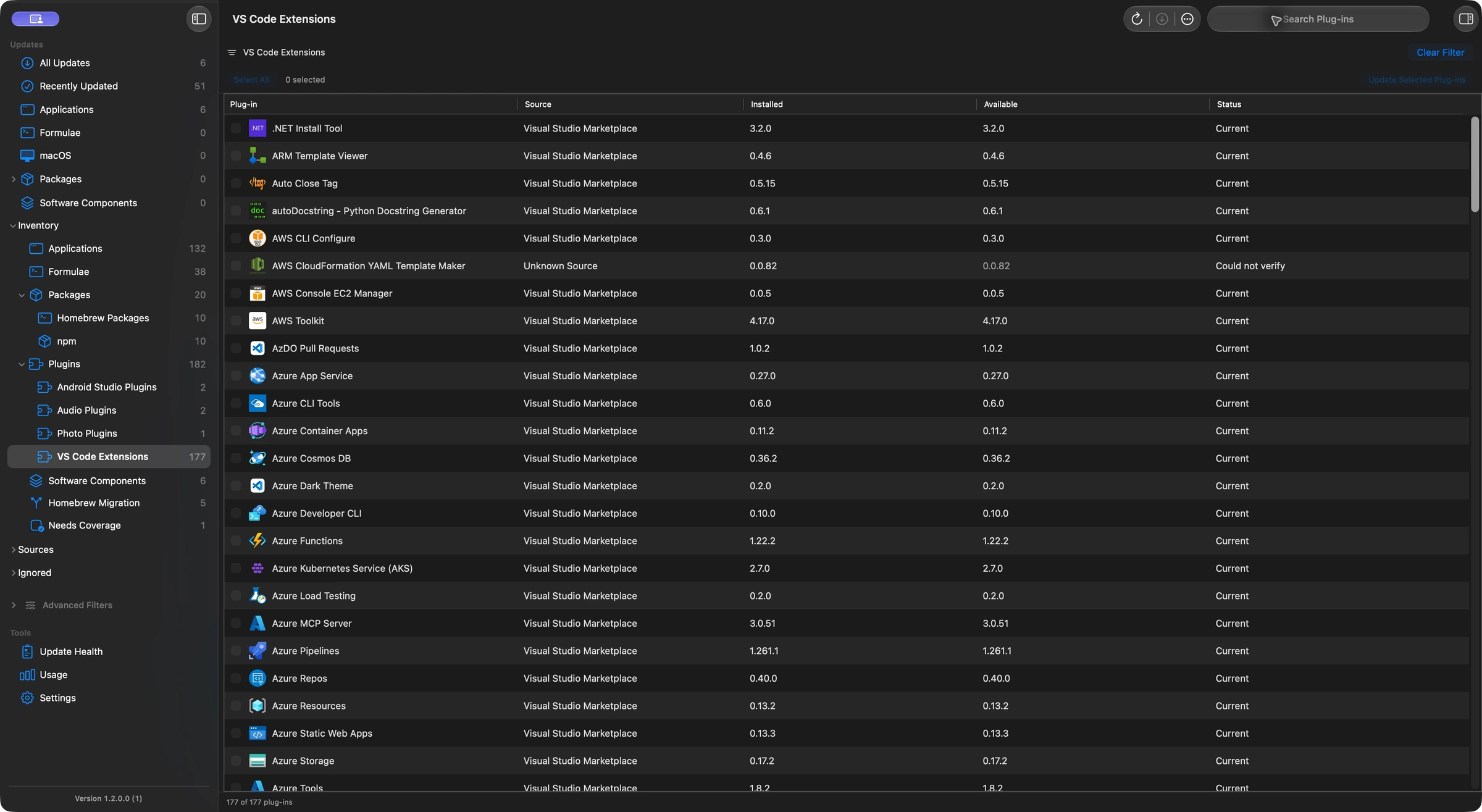
macCurrent updates eligible VS Code and Antigravity extensions through the verified editor and eligible JetBrains and Android Studio plug-ins with Quit and Update. It checks compatibility and preserves the selected editor profile or IDE installation. Explicitly selected pinned editor extensions can update once while keeping their pin; Update All skips pinned extensions.
Choose the editor installation before updating
For the coverage described here, use macCurrent 1.2.0.65 or later. Extensions and plug-ins belong to an editor or IDE installation. Updating the editor app and updating its add-ons are separate tasks. These scenarios illustrate supported workflows; the action depends on the installed copy and compatible release.
- Run Scan, then open Plugins and find the editor extension or IDE plug-in.
- Review the owning editor, profile or IDE installation and the available version.
- Use Update Now for an eligible editor extension, or Quit and Update for an eligible JetBrains or Android Studio plug-in.
- Save work before an owning app needs to quit. macCurrent reopens an app that was running.
- Review the installed result in macCurrent and check the extension or plug-in in the owning editor.
Verified Microsoft VS Code, VS Code Insiders and supported Antigravity installations have eligible extension routes. Other editors, unsupported installation locations or unverifiable sources can require their own updater.
Use case: update a pinned GitLens extension once
You pinned GitLens while keeping a development setup stable. Now you want to try a specific offered update without allowing future bulk updates to move it automatically.
- Select the pinned GitLens installation explicitly in macCurrent.
- Review the offered release and the owning VS Code installation and profile.
- Start the eligible selected update, then check the installed result.
The selected extension can update once while retaining its pin. Future Update All actions continue to skip it.
A pin is not a compatibility override. The selected release still needs to pass the editor, source and installation checks. This selected-update behavior is included in macCurrent 1.2.0.65.
Use case: keep work and personal VS Code profiles separate
You use different VS Code profiles for a work repository and a personal project. An extension appears in a supported profile, and you want to review the installed copy before updating it.
- Choose the extension entry and review the editor and profile information macCurrent found.
- Check that the available release matches the editor version, Mac architecture and release channel.
- Use the eligible update action, then verify the result in that profile.
macCurrent uses the supported editor/profile scope recorded for the installation. It does not choose a different editor just because the extension name matches.
VS Code can share extension installations across profiles. Profile selection does not promise a separate physical copy for every profile. Use the editor’s own profile controls to manage shared extensions or unsupported scopes. Microsoft explains VS Code profiles.
Use case: review an IdeaVim update before an IntelliJ session
You use IdeaVim for Vim-style editing in IntelliJ IDEA. You want to review an available plug-in update before starting a work session.
- Find the installed IdeaVim entry under Plugins and confirm the owning IntelliJ IDEA installation.
- Review the compatible Marketplace release. Save your work and use Quit and Update when offered.
- Allow the update to finish. macCurrent verifies the installed result and reopens the IDE if it had been running.
When the installed copy and offered release qualify, the IdeaVim update stays tied to that IDE installation. The same name in another IDE is not authority to replace it.
Bundled plug-ins, unsupported dependencies, custom repositories and unverifiable sources can require the IDE’s own tools. An Android Studio plug-in also needs to qualify for its own route. See JetBrains plug-in management.
Plug-in sources, backups and other host apps
Automatic plug-in backups follow your backup settings. They are not backups of your repositories, documents or entire editor setup. Save your work and keep project files backed up separately.
Obsidian community plug-ins stay tied to their vaults, and audio plug-ins can need a vendor updater or account. Read the Mac plug-in overview for those workflows.
Frequently asked questions
Can macCurrent update VS Code extensions and JetBrains plug-ins?
Yes, for eligible installations and compatible releases. VS Code and supported Antigravity extensions use the verified editor. Eligible JetBrains and Android Studio plug-ins use Quit and Update, followed by installed-state verification.
Can I update a pinned VS Code extension without removing its pin?
Yes. Explicitly select an eligible pinned extension, such as GitLens, for a one-time update. The pin is preserved and Update All continues to skip pinned extensions. Compatibility checks still apply.
Does macCurrent keep editor profiles separate?
macCurrent uses the supported editor and profile scope recorded for the selected installation. VS Code can share extension installations across profiles, so separate profiles do not guarantee independent physical copies. Unsupported scopes need the editor’s own controls.
Will macCurrent close IntelliJ IDEA to update a plug-in?
Eligible JetBrains updates use Quit and Update. Save your work first. macCurrent reopens the owning app if it was running and checks the installed result.
Can macCurrent update bundled or private IDE plug-ins?
Discovery does not guarantee a direct update. Bundled plug-ins, custom or private sources, unsupported dependencies and unverified installations can need the owning IDE or plug-in manager.